

Support
Page destinée à mon utilisation personnelle !... mais qui peut servir.
- Imprimantes Epson
- Fujitsu Siemens
- Toshiba
- Acer
- Notebook Aspire 5738Z
- Dell
- Latitude E4300
- Inspiron 6400
- HP (Hewlett Packard)
- Problème vidéo portable
- Pavilion Media Center m8190.fr
- Pavilion série dv9700
- Pavilion série dv6
- Pavilion 402.fr
- Imprimantes HP
- HP Total Care Advisor
Voir ma page : Les ordinateurs de grande marque
Télécharger et exécuter l'outil de désinstallation Norton
 Imprimantes Epson :
- Support technique en français
Exemple :
- Epson Stylus SX235W
- Téléchargement de pilotes Epson SX235W - Windows 8 - 64 bits
Fujitsu Siemens :
Support - Informatique :
http://support.ts.fujitsu.com/index.asp?lng=fr&LNID=1347
Amilo Pro :
Forum :
http://www.amilo-forum.com/
Toshiba :
Toshiba Europe :
http://eu.computers.toshiba-europe.com/innovation/home/
Support PC Portable - Français :
http://fr.computers.toshiba-europe.com/innovation/generic/product-support?service=FR
TECHNICAL SUPPORT CENTER
http://eu.computers.toshiba-europe.com/innovation/jsp/supportMyProduct.do?service=EU
Support :
http://www.csd.toshiba.com/cgi-bin/tais/support/jsp/home.jsp
Forums :
http://forums.computers.toshiba-europe.com/forums/index.jspa
Vidéo du centre d'assistance Toshiba Europe (FR)
http://www.youtube.com/user/toshibasupportfr
Problème de reconnaissance disque dur :
Check cable connection!
PXE-M0F : Exiting Intel PXE ROM.
No bootable device -- insert boot disk and press any key
Le disque dur n'est pas reconnu.
Vérifier d'abord si le disque dur est visible dans le Bios :
Au démarrage de l'ordinateur :
- appuyer sur F12
Dans le Bios :
- vérifier la ligne : HDD/SDD:
- Si le disque dur est affiché on peut récupérer les données ou réinstaller le système
- Si : HDD/SDD: NONE = le disque dur n'est pas reconnu par le Bios :
donc, mauvais branchement ou problème de carte mère
Voir :
Forums.Toshiba.com - PXE M0F Check cable connection
Forums.Toshiba.com - Check Cable Connection! PXE-M0F:Exiting Intel PXE ROM
Techsupportforum.com - Check cable connection.. ! PXE-M0F: Exiting Intel PXE ROM Boot Error
justanswer.com - my toshiba notebook said check cable connection PXE-MOF
Acer :
http://www.acer.fr/ac/fr/FR/content/support
Notebook Aspire 5738Z :
Acer Aspire 5738Z
Acer Aspire 5738Z Notebook Series Specifications :
Support.acer.com - Acer Aspire 5738Z Notebook Series Specifications
Tests :
FICHE TECHNIQUE ACER ASPIRE 5738Z-424G50MN
http://www.01net.com/fiche-produit/fiche-technique-6489/pc-portables-acer-aspire-5738z-424g50mn/
07/05/2009 : LaptopSpirit.fr - Acer Aspire 5738Z, portable 15.6 pouces attractif à 499€ (T4200, 500 Go, HDMI)
Dell :
Dell est une marque dont les ordinateurs sont vendus par Internet
A de rares exceptions (?), on ne peut pas acheter un Dell en magasin


- Support technique - Téléchargement de pilotes
En cas de problème :
- aller sur le site Dell Support,
- rentrer le numéro de série de l'ordinateur
On dispose immédiatement de la durée de la garantie restante.
- contacter Dell par mail ou par téléphone pour tout problème (particulièrement ceux relevant de la garantie)
Latitude E4300 :
support.dell.com - Dell™ Latitude™ E4300
http://support.dell.com/support/edocs/systems/late4300/fr/index.htm
L'ultra portable Latitude E4300 a un trackpad inutilisable :
13/08/2008 : Forum.telecharger.01net.com - Dell Latitude E4300
"Les nouveaux ultraportables de la gamme professionnelle de Dell embarquent la nouvelle plate-forme Centrino 2 ainsi que de nombreuses innovations, telles que le système d'exploitation léger pour démarrer la machine en quelques secondes ou le cryptage du disque de série...
Problèmes de touchpad :
... Le touchpad et une calamité à utiliser. Même avec le driver réglé dans tous les sans, ce touchpad ne fait pas la différence entre une pression et un déplacement.
...
Le touchpad met plusieurs secondes à réagir après utilisation du clavier (le support de Dell m'a dit que c'était une incompatibilité avec windows 7 et que ce n'était pas matériel, qu'en revanche "ce n'est pas très grave d'attendre quelque secondes que votre touchpad s'active",
29/09/2009 : LesDelliens.com - [E4300] Dell Touchpad Désinstallation de l'application driver Dell Touchpad
"Sur mon E4300 je ne supporte plus le pavé tactile qui déconne sans arret. J'ai des lags énormes lorsque je scroll, parfois ma souris accélère, ralenti, accélère puis ralenti.
...
maladie des pad de DELL. Plein de gens ont cela, des blocages de microsecondes qu'on enlève en cliquant gauche souvent.
Forum.Hardware.fr - [Topic unique] DELL Latitude E4300 et E4200
Inspiron 6400 :
Avis :
Clubic.com - [Avis
utilisateur] ~~ Dell Inspiron 6400 ~~ - **Core Duo T2300-ATi X1400-1,5 GB RAM**
20/11/2007 : Linternaute.com - Fiche
technique : DELL Inspiron 6400
20/11/2006 : Bestofmicro.com - Le
PC portable Dell Inspiron 6400 en détail : Test - Photos
HP :
Hewlett Packard est une grande marque d'ordinateurs et d'imprimantes.
Ils ont racheté la marque Compaq
A l'origine, Hewlett Packard était une marque de qualité, principalement destinée
aux professionnels.
Puis, la marque a visé la clientèle grand public. En dernier, HP semble vouloir concurrencer
des marques de qualité "moyenne" comme Acer : les prix baissent... mais la qualité aussi.
Il reste cependant des modèles de meilleure qualité, à un prix plus élevé.

Support pour les ordinateurs HP et Compaq :
http://www8.hp.com/fr/fr/drivers.html
Problème vidéo portable :
Ceci concerne un problème vidéo représentant un vice caché sur certaines séries de portables équipés d"une puce graphique Nvidia d'un modèle particulier.
Portable : HP Pavilion séries dv2000/dv6000/dv9000 et Compaq Presario séries V3000/V6000
HP a identifié un problème matériel avec certains ordinateurs portables HP Pavilion séries dv2000/dv6000/dv9000 et Compaq Presario séries V3000/V6000, et a également rendu disponible un nouveau BIOS pour ces ordinateurs portables (version F.39 pour les séries dv2000/V3000 et version F.3D pour les séries dv6000/dv9000/V6000). (lire la suite)
Commentcamarche.net - Carte mère HP Pavillon une grosse arnaque !!
Tomsguide.fr - Remplacement carte mere hp pavillion a248.fr
HP Pavilion Media Center m8190.fr :
Page principale :
Assistance technique : Ordinateur de bureau HP Pavilion Media Center TV m8190.fr
Détails et accès aux caractéristiques du matériel :
Caractéristiques de l'ordinateur de bureau HP Pavilion Media Center m8190.fr***
Manuel en PDF :
Manuel de mise à niveau et d'entretien
Détails sur la carte mère :
Carte mère IPIBL-LA (Berkeley)
- Berkeley-GL8E
- Micro-ATX: 24.4 cm (9.6 inches) x 24. cm (9.6 inches)
- Northbridge: Intel G33
- Socket type: 775
- RAM : 4 x DDR2 - Vitesses du bus frontal : 1 333, 1 066 et 800 Mhz - PC2-5300 Mo/s
Forum des utilisateurs HP - Carte mère ASUS IPIBL-LA
- Problème : Rien à l'écran lors de l'alumage du PC (l'écran reste éteint), pas de bip au demarrage, CG OK - Pas de bip au démarrage sans les RAM
- Le probleme du changement de CM sur les PC de marque c'est que cela t'obligera a acheter une licence Windows car les dvd de recup systeme seront inutilisables.
- Voir une méthode de test en démontant la carte-mère
Carte de remplacement ? avec chipset Intel G31 :
- ASRock G31M-GS chez LDLC
Avec chipset P965 Express ??
- ASRock P5B-DE
Sur eBay ???
- new ASUS IPIBL-LA(Berkeley) INTEL G33 ICH9R SOCKET-775 DDR2 1333MHZ MOTHERBOARD
Résoudre un problème :
- Le système s'amorce avec un écran noir
- Résoudre un problème
Forum.Rue-Mongallet.com - Sujet : Tutorial : Pour les Problèmes d'ecran noir au démarrage
Pavilion
série dv9700 :
HP.com - Ordinateur portable multimédia HP Pavilion série dv9700 - Présentation générale
Pavilion
série dv6 :
hp.com - Gamme d'ordinateurs portables de loisirs HP Pavilion dv6
HP Pavilion dv6-2010sf = problème vidéo
hp.com - La batterie n'alimente pas l'ordinateur portable ou ne reste pas chargée
Pavilion
402.fr :
Ordinateur de bureau HP Pavilion 402.fr :
http://h10025.www1.hp.com/ewfrf/wc/product?lc=fr&dlc=fr&cc=be&product=85189&lang=fr
Pilotes et logiciels pour Windows XP :
http://h10025.www1.hp.com/ewfrf/wc/softwareList?os=228&lc=fr&dlc=fr&cc=be&lang=fr&product=85189
HP pavilion 402.fr, En réparation! :
http://forum.zebulon.fr/hp-pavilion-402fr-t54861.html
Imprimantes
HP :
Des problèmes peuvent survenir à l'installation d'une imprimante :
Si on installe le logiciel à partir du CD-ROM : celui-ci peut-être dépassé ou
incompatible avec Windows.
Il faut, en ce cas, télécharger le dernier logiciel sur le site HP (ou commander un CD-ROM
si on ne dispose pas de connexion ADSL)
Obtaining and Installing the Software and Drivers in Microsoft Windows
HP Photosmart C4250 :
HP Photosmart C4200 All-in-One Printer series
HP Photosmart C4200 All-in-One Series - Uninstalling the Software in Microsoft Windows
Si vous voulez désinstaller le pilote parce qu'il n'a pas été installé correctement la première fois, ou qu'il ne semble pas fonctionner correctement : commencer par utiliser le HP All in One Check Utility
HP Photosmart C4480 :
- Téléchargements de pilotes et logiciels - Imprimante tout-en-un HP Photosmart C4480
HP
Total Care Advisor :

HP
Support : Using HP Total Care Advisor
Comment utiliser l'outil (en anglais)
HP Total Care Advisor est un outil qui permet d'accéder facilement aux informations de l'ordinateur, détails sur la garantie, connexions aux périphériques (ex : imprimantes).
Lancement :
Par défaut, HP Total Care Advisor se lance automatiquement au démarrage de l'ordinateur,
et s'affiche en haut de l'écran.
Pour démarrer le programme manuellement :
- menu Démarrer, Tous les programmes, HP Total Care Advisor
Utilisation :
HP Total Care Advisor a deux parties principales :
- les onglets (en bas)
- la partie supérieure (dont l'affichage correspond à l'onglet sélectionné)
Voir la page :
http://h10025.www1.hp.com/ewfrf/wc/document?docname=c01124811&lc=en&cc=us&dlc=en&product=3376325
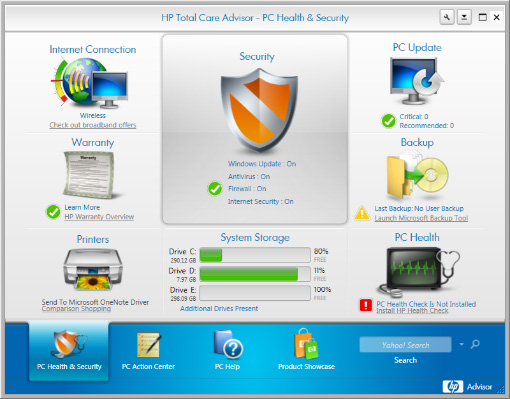
En fait, c'est surtout le premier onglet (PC Health & Security) qui contient des informations intéressantes.
| Internet Connection | The Internet connection tool can help find a broadband or dialup package from an Internet Service Provider (ISP), and can assist in setting up and monitoring an Internet connection. |
| Warranty | The warranty tool connects to HP warranty information on the web, and can take you directly to HP Total Care for warranty services. HP Total Care provides many different ways to get computer help, including on-line help documentation, chatting with a personal SmartFriend assistant online, and speaking with a customer service representative by phone. |
| Printers | The printers tool allows you to manage and monitor up to 15 printers from the computer, all in the same place. This tool also provides information about printer supplies, such as ink cartridges and HP photo paper. |
| Security | Security offers access to critical information from Norton Internet Security, if installed, or from Windows software, firewall, and security. HP recommends setting the firewall and internet security options to On. |
| PC Update | PC Update provides critical and suggested updates for drivers, BIOS, and some software. |
| Backup | The backup tool can set up a backup schedule, and checks when the system and your important files were last backed up. |
| PC Health | PC Health actively scans the computer to alert you of important updates from HP and to detect Hardware or Software conditions that may impact the performance of the computer. |
Désactivation :
- cliquer sur le bouton Préférences,
- décocher la case "Lancer HP Total Care Advisor au démarrage",
- cliquer sur Ok.
Voir aussi :
http://hp-total-care-advisor.software.informer.com/
Compaq :
Compaq est une marque qui a été racheté par Hewlett Packard.
Le support des ordinateurs Compaq est donc sur le site Hewlett Packard
Support pour les ordinateurs HP et Compaq :
http://www8.hp.com/fr/fr/drivers.html
Ordinateur
de bureau Compaq Presario :
Compaq Presario SR2203FR :
Assistance technique HP - Ordinateur
de bureau Compaq Presario SR2203FR
Ordinateur
portable Compaq Presario :
Compaq Presario C700 :
Assistance technique HP - Ordinateur
portable Compaq Presario C700EM
Packard
Bell :
Packard Bell est une marque qui doit son essor à la confusion entretenu dans la clientèle avec la marque Hewlett Packard, synonyme de qualité.
Les ordinateurs Packard Bell furent longtemps une calamité lorsqu'il était question de
les réparer : matériel et assemblage spécifiques (exemple : alimentation non compatible).
Rien n'était réparable.
Cela semble s'être arrangé ?
Il reste que les procédures de tatouage de disque dur sont largement critiquables.

Veuvenoire07 - Prcédure de tatouage pour un ordinateur Packard Bell
Acer :
Une marque très répandu en grandes surface.
Ordinateurs de qualité moyenne... bien que certains s'en satisfont.
De toute façon, tout est fabriqué en Chine maintenant et tout dépend des composants
utilisés dans la fabrication en grande série.

Pilotes et support :
Support.acer-euro.com - Support
: Drivers & Utilities
Medion :
Support :
http://www.medion.com/fr/service/frame/top.htm
medion.free.fr - Le forum Medion
Sony ICD U60 :
Il s'agit d'un Voice recorder : Magnétophone numérique
Assistance Sony France :
http://www.sony.fr/support/fr/product/ICD-U60
Il ne semble pas être utilisable sur Mac OS X :
Discussions.apple.com - Sony IC Recorder ICD-U60 won't connect
Forums.macnm.com - How to Use a Sony ICD-P320 Voice Recorder with a Mac
Voir aussi : Convertir fichier audio DVF vers WMA ou MP3
Mon avis : Une vraie s...ie.
Format propriétaire et incompatible.
Sony, comme à son habitude, cloisonne et restreint l'accès à ses fichiers, rendant souvent inutilisables ses produits.
(les privilèges des monopoles).
Une marque à fuir.
Un logiciel sensé convertir les fichiers du Voice Recorder :
Sony Digital Voice Editor
http://sony-digital-voice-editor.software.informer.com/
Ne pas installer : une usine à gaz de 100 Mo, qui oblige à redémarrer l'ordinateur après installation, et qui est incompatible avec le ICD u60
Windows :
Onglet Sécurité dans XP Home :
Dans la fenêtre Propriétés d'un fichier ou d'un dossier, l'onglet Sécurité permet
de configurer les autorisations d'accès.
Sous Windows XP Professionnel, il est présent.
Sous Windows XP Home (Familliale), il faut faire une manipulation pour l'afficher.
Télécharger : Security Configuration Manager
Voir aussi :
http://jc.bellamy.free.fr/fr/windowsxp2003.html#securitytabXPHOME
Lenteur
de Windows Vista :
Lenteur de l'Explorateur :
L'Explorateur Windows dans Vista a des bugs : lenteurs, crash etc... Ils sont corrigés dans le SP 1.
En attendant :
- cliquer sur l'orbe Démarrer,
Dans Exécuter (case Rechercher) :
- taper :
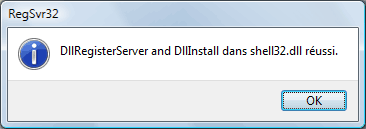
regsvr32 /i shell32.dll
Si l'opération est réussie, la fenêtre suivante s'affiche :
La commande RegSvr32 :
Support.microsoft.com - Explications
concernant l'utilisation de Regsvr32 et les messages d'erreur
Vous pouvez utiliser l'outil Regsvr32 (Regsvr32.exe) pour enregistrer et supprimer l'enregistrement des
contrôles OLE tels que les fichiers DLL et OCX consignés automatiquement dans le registre.
RegSvr32.exe propose les options de ligne de commande suivantes :
Regsvr32 [/u] [/n] [/i[:ligne_commande]] Nom_dll
/u - Supprimer l'enregistrement du serveur
/i - Appeler DllInstall avec une option [ligne_commande] facultative ;
Avec /u Désinstallation Dll appelée
/n - Ne pas appeler DllRegisterServer ; cette option doit être utilisée avec /i
Désactivation Indexation, Recherche, Restauration système :
Ca n'est pas souhaitable (en particulier pour la restauration système), mais ça peut accélérer
le fonctionnement de Windows Vista.
Au moins éliminer ces incessantes utilisations du disque dur.
